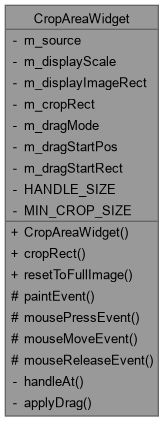
The CropAreaWidget class Displays the image scaled to fit a reasonable dialog size, with a draggable, resizable crop rectangle overlaid on top – the area outside it dimmed, the usual visual convention for "this part goes
away" during a crop, so it's never ambiguous which region survives. All internal geometry (the crop rect, drag handling, hit-testing) works in display-space pixel coordinates; only cropRect() converts back to the original, full-resolution image's own coordinates for the caller, the same original-vs-display distinction already used for colour sampling in ImageTransparentColorDialog.
More...
#include <imagecropdialog.h>
Inherits QWidget.
|
| void | paintEvent (QPaintEvent *event) override |
| | CropAreaWidget::paintEvent Draws the image, dims everything outside the crop rect (four strips around it, rather than one overlay with a hole cut out of it, since that would need a more involved clip/composition setup for no real benefit here), then the rect's own dashed border and its eight handles.
|
| void | mousePressEvent (QMouseEvent *event) override |
| void | mouseMoveEvent (QMouseEvent *event) override |
| void | mouseReleaseEvent (QMouseEvent *event) override |
|
| DragMode | handleAt (const QPoint &pos) const |
| | CropAreaWidget::handleAt.
|
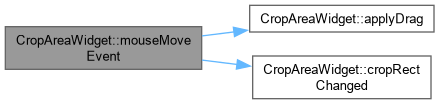
| void | applyDrag (const QPoint &pos) |
| | CropAreaWidget::applyDrag Recomputes m_cropRect from m_dragStartRect plus however far pos has moved from m_dragStartPos, according to m_dragMode – always clamped to stay within the displayed image and never smaller than MIN_CROP_SIZE, so the rect can never escape its bounds or collapse to nothing while being dragged.
|
The CropAreaWidget class Displays the image scaled to fit a reasonable dialog size, with a draggable, resizable crop rectangle overlaid on top – the area outside it dimmed, the usual visual convention for "this part goes
away" during a crop, so it's never ambiguous which region survives. All internal geometry (the crop rect, drag handling, hit-testing) works in display-space pixel coordinates; only cropRect() converts back to the original, full-resolution image's own coordinates for the caller, the same original-vs-display distinction already used for colour sampling in ImageTransparentColorDialog.
◆ DragMode
| Enumerator |
|---|
| None | |
| Move | |
| ResizeN | |
| ResizeS | |
| ResizeE | |
| ResizeW | |
| ResizeNE | |
| ResizeNW | |
| ResizeSE | |
| ResizeSW | |
◆ CropAreaWidget()
| CropAreaWidget::CropAreaWidget |
( |
const QImage & | sourceImage, |
|
|
const QRect & | initialCropRect = QRect(), |
|
|
QWidget * | parent = nullptr ) |
|
explicit |
CropAreaWidget::CropAreaWidget.
- Parameters
-
| sourceImage | the full, uncropped image to crop from |
| initialCropRect | a previously-chosen crop rectangle, in sourceImage's own coordinates, to start from – an empty (default-constructed) QRect means "no previous crop", i.e. start covering the whole image. |
| sourceImage | the full-resolution image to crop |
| initialCropRect | a previously-chosen crop rect (in sourceImage's own coordinates), or an empty QRect to start covering the whole image |
| parent | |
◆ applyDrag()
| void CropAreaWidget::applyDrag |
( |
const QPoint & | pos | ) |
|
|
private |
CropAreaWidget::applyDrag Recomputes m_cropRect from m_dragStartRect plus however far pos has moved from m_dragStartPos, according to m_dragMode – always clamped to stay within the displayed image and never smaller than MIN_CROP_SIZE, so the rect can never escape its bounds or collapse to nothing while being dragged.
- Parameters
-
| pos | current widget-space mouse position |
◆ cropRect()
| QRect CropAreaWidget::cropRect |
( |
| ) |
const |
CropAreaWidget::cropRect.
The current crop rectangle, in the original image's own coordinates (not display-space) – always clamped to the image's own bounds and never degenerate (zero width/height).
- Returns
- the crop rectangle in the original, full-resolution image's own coordinates – m_cropRect itself is display-space only.
◆ cropRectChanged
| void CropAreaWidget::cropRectChanged |
( |
| ) |
|
|
signal |
◆ handleAt()
CropAreaWidget::handleAt.
- Parameters
-
| pos | widget-space position to test |
- Returns
- whichever handle (or the rect's own interior, for moving) pos is close enough to, or DragMode::None if it's not near anything
◆ mouseMoveEvent()
| void CropAreaWidget::mouseMoveEvent |
( |
QMouseEvent * | event | ) |
|
|
overrideprotected |
◆ mousePressEvent()
| void CropAreaWidget::mousePressEvent |
( |
QMouseEvent * | event | ) |
|
|
overrideprotected |
◆ mouseReleaseEvent()
| void CropAreaWidget::mouseReleaseEvent |
( |
QMouseEvent * | event | ) |
|
|
overrideprotected |
◆ paintEvent()
| void CropAreaWidget::paintEvent |
( |
QPaintEvent * | event | ) |
|
|
overrideprotected |
CropAreaWidget::paintEvent Draws the image, dims everything outside the crop rect (four strips around it, rather than one overlay with a hole cut out of it, since that would need a more involved clip/composition setup for no real benefit here), then the rect's own dashed border and its eight handles.
◆ resetToFullImage
| void CropAreaWidget::resetToFullImage |
( |
| ) |
|
|
slot |
CropAreaWidget::resetToFullImage.
Resets the crop rectangle back to covering the entire image – the direct answer to "I want to undo the crop, not just
adjust it", since dragging every handle back out by hand to exactly the original extent is needlessly fiddly.
◆ HANDLE_SIZE
| int CropAreaWidget::HANDLE_SIZE = 8 |
|
staticconstexprprivate |
◆ m_cropRect
| QRect CropAreaWidget::m_cropRect |
|
private |
◆ m_displayImageRect
| QRect CropAreaWidget::m_displayImageRect |
|
private |
◆ m_displayScale
| qreal CropAreaWidget::m_displayScale = 1.0 |
|
private |
◆ m_dragMode
◆ m_dragStartPos
| QPoint CropAreaWidget::m_dragStartPos |
|
private |
◆ m_dragStartRect
| QRect CropAreaWidget::m_dragStartRect |
|
private |
◆ m_source
| QImage CropAreaWidget::m_source |
|
private |
◆ MIN_CROP_SIZE
| int CropAreaWidget::MIN_CROP_SIZE = 16 |
|
staticconstexprprivate |
The documentation for this class was generated from the following files:






 1.15.0